


As a government official in Uttar Pradesh, chances are that you are aware of the state HRMS portal, ehrms.upsdc.gov.in up. It allows you to view your salary slip, apply for leave, access your pension information and even your service record from your phone or computer.
No more standing in long lines at the HR Office for a simple document. We will guide you through what you can do and how you can log in to the portal and how to handle issues if they arise.
What Is ehrms.upsdc.gov.in up?
The Uttar Pradesh government has created an online HR management system called ehrms.upsdc.gov.in for its employees. Consider it a virtual HR office, working around the clock. Employees don’t have to fill out paper forms or visit a government building to complete most of their HR functions, they can log in and do them all right there on the website.
The aim is straightforward: to improve the transparency of government, reduce paperwork, and increase the control of government records held by employees. The portal is for everyone whether you are working or retired.
Key Features of the Portal
Once you have logged in, here are the things you can do:
- Employee Self-Service (ESS): Access and keep track of your personal and employment information without having to ask for assistance from HR personnel.
- Salary Slips and Pay Details: Get your monthly pay slip and see a breakdown of deductions and allowances.
- Leave Management: View remaining leave days, apply for leave, etc. and track the approval status of your leave request.
- Service Records: View your complete employment record with joining date, promotions and transfers in one location.
- Grievance Redressal: Any complaint or HR related issues? It can be submitted directly via the portal.
- Pension and Retirement Info: Retired employees can log in to see pension payments and other retirement benefits.
- Notifications: Keep track of policy updates and information about job-related announcements.
Read Also: What Is Newslikeyou.com? An Honest Look Inside in 2026
How to Access the Portal
It’s easy to get started. Here’s what to do:
- Go to the website. Open your browser and go to ehrms.upsdc.gov.in.
- Log in. Type in your employee ID and password. First timers must register and create a password to log in.
- Check the dashboard. You’ll be able to view all services provided on one page once you’ve logged in.
- Do what you have to do. Download a document, apply for leave or update your information as appropriate.
Well, that’s all there is, really. The entire concept behind ehrms.upsdc.gov.in up is to make these tasks quick and hassle-free.
Benefits For Employees
So what is the significance of this portal? A few reasons:
- It’s convenient. No office hours, log in any time, anywhere.
- It saves time. Tasks, which previously required a HR office visit, now take a couple clicks.
- It’s transparent. Can clearly view your salary breakdown and history of services, none of this guessing.
- It cuts down on errors. There’s a tendency to make errors with manual documentation. A digital system minimizes that risk.
- It’s secure. Security measures are in place to ensure that personal and financial information is kept safe.
Common Issues and How to Fix Them
As with any Internet-based system, there may be a few glitches to be experienced. Here are the steps you should take to deal with the most frequently occurring ones:
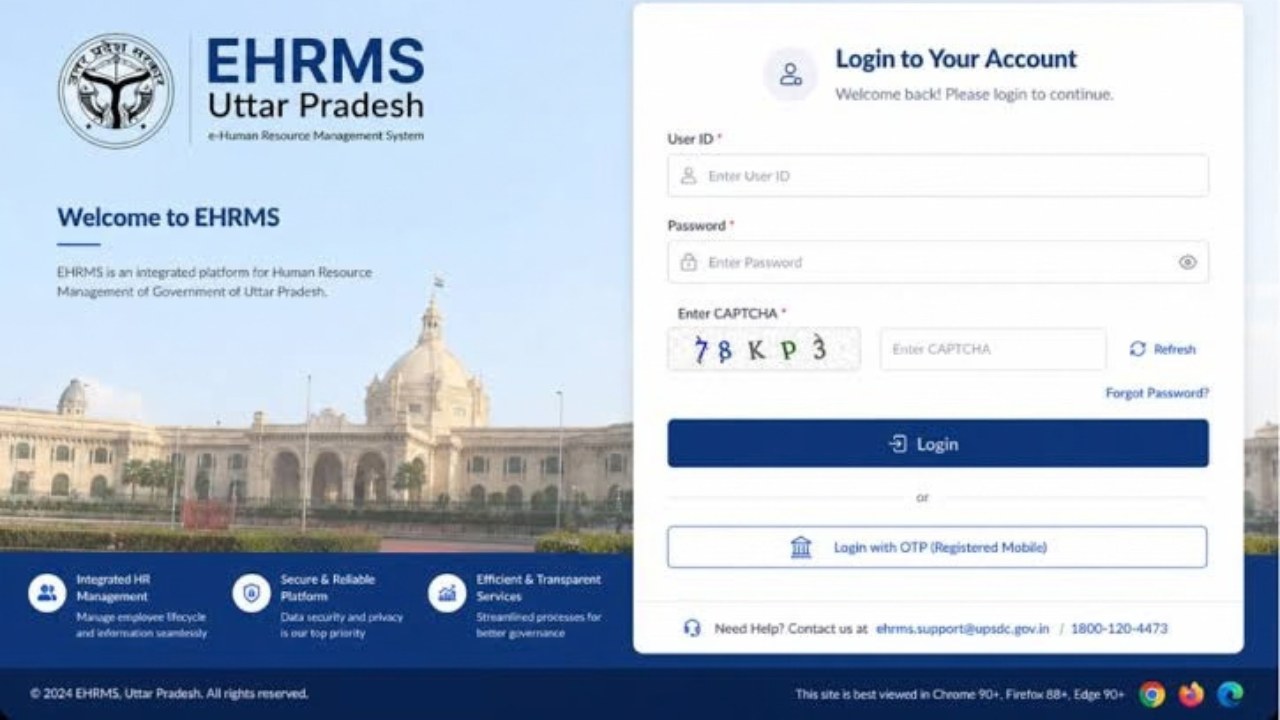
- Forgot your password? On the login page, click on “Forgot Password”. The reset will typically require your employee ID or registered mobile number.
- Site is down or slow? Typically occurs during maintenance. Wait some time, and try again some time later.
- There is an error in your records? If you don’t receive the amount you think you should be earning or your service data is incorrect, you should talk directly with your HR department and they will fix it.
Final Word
The ehrms.upsdc.gov.in up portal has made the lives of thousands of workers of the Uttar Pradesh government easier. It consolidates everything you need to know about your salary slip, leave and pension applications, and more, reducing paperwork and saving you time. It’s probably a good idea to bookmark it in case you need to perform HR related tasks in the future.
FAQs
1. What is the purpose of ehrms.upsdc.gov.in up?
It is an HR Portal for UP Government employees. It can be used to download the salary slips, apply for leave etc.
2.How can I access the portal?
Log into the official website using your employee ID and password, then you will appear on your employee dashboard. To log in, you must be a registered user and have a password.
3. What if I forgot my password?
On the login page, click on “Forgot Password”. To reset a password you will be required to provide a mobile number (registered) or employee ID to verify your identity.
4. Do retired employees have access to this portal?
Yes, Retired UP government staff members are also able to log in and view their pension payments and other benefits for their retirement using the same system.
5.If my salary information is incorrect, who do I contact?
Contact the HR office of your department. They may check your record and correct any errors that you may have in your salary information or service history.
Read More: Techtvhub Com: A Complete Overview of the Tech Blog and What It Offers
